The Most Expensive Excel File in Oil & Gas
Published: 2026-06-16
Despite the development of digital platforms, a significant portion of field data in the oil and gas industry still passes through Excel templates. In this article, we will examine how this practice creates hidden costs and why the problem lies not in Excel itself, but in the disconnect between data collection and data usage.
Anecdote and context
A patient walks into a doctor’s office and says:
- Doctor, I have a problem, one testicle has become larger.
- Show me, - says the doctor
- Only, please, don't laugh, - the patient asked
- Well, what are you saying, we never laugh at patients
The patient showed one testicle. The doctor was stunned and still burst out laughing.
- Well, you said you wouldn't laugh, now I'm not going to show you the big one at all!
Why this anecdote and what does it have to do with my web service for processing CSV files?
The patient and the testicles are the drilling company management, and drilling reports are those same testicles, as they say, just from a different angle.
There is a complex ecosystem in the oil and gas industry. On one hand, giants like Schlumberger or Shell have been using expensive, integrated real-time data collection platforms like WITSML for decades. On the other hand, the vast majority of medium and small drilling companies, independent contractors, and service crews that do the bulk of the work in the field continue to operate in the 20th-century paradigm. They fill out paper logs or Excel templates. Why? Because it is cheap, "flexible," and does not require expensive implementation specialists.
We are talking about these "actors" — the bulk of the field executors. And for supervisory personnel, as well as middle management, it is extremely important to report on production progress in a timely manner.
As you understand, in the first case, the process drags on for hours or even days. The drilling superintendent has to get to the office, open their laptop, and, looking at a handwritten log and the computer screen, fill out some electronic drilling report form. And that is where the most interesting part begins.
It is good if this electronic form/template was properly configured and its data is transmitted directly to the database. But in reality, in most cases, this template is a "thing in itself." The completed file sits as dead weight in the file system, and superiors are sent a link to its location.
SharePoint as an expensive archive
And here we come to SharePoint. Many companies, having purchased licenses for this "powerful enterprise platform," use it as a very expensive folder with rhinestones. And here I want to make an important clarification based on real practice. Even in a perfectly configured SharePoint environment, with workflows and versioning, its "database integration" in 90% of cases means one thing: the database stores not the report itself, but a link to the report. Yes, the system confirms: "Report #123 from 15.06.2026 received, it is located here, the drilling work for the shift has been accepted for payment." For accounting and formal document flow, it is ideal.
But for a geologist who needs to make a decision on whether to drill further or shut down, this data is useless. It is not consolidated. It is not available for statistical analysis. The report lies in a "digital archive" like a book in a library without a catalog. You can find it, but comparing indicators for ten wells over a month is already a task for an analyst.
Hooray, the job is done. The supervisor finds the file via the link, prints it, and brings it to the boss’s desk. The cycle of formal execution is closed.
Analyst's struggle
Someone in this chain, sooner or later, must ensure the analytical project database is populated with new drilling data so that the senior or chief geologist can build a graph, see the trends, and make an informed decision. That "someone" is our patient from the anecdote — a data technician or a data analyst from the IT department.
Why? Is he sick and his "testicles" are swollen?!
No. "The testicles" are the links to drilling reports he received via email. For example, it looks like this:
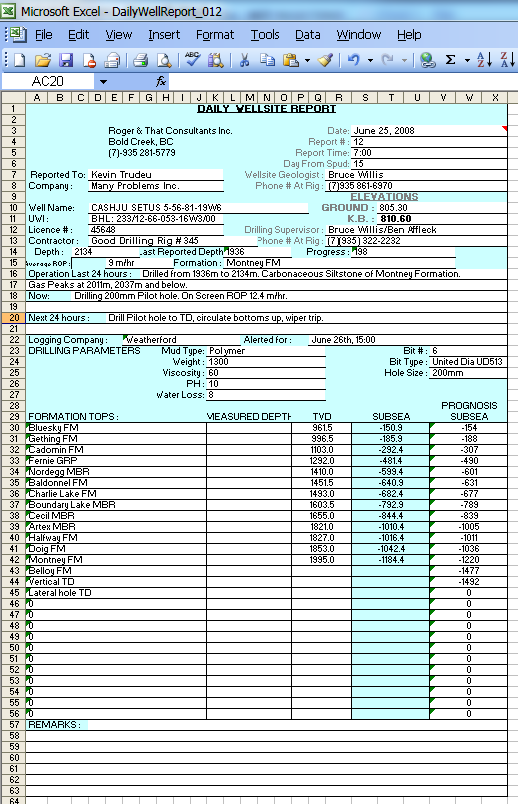
If the data from the report is not yet in the analytical database, it is now his direct responsibility to move it there promptly.
And how is he supposed to do that? The happiest scenario is to use a "magic" macro in Excel that he wrote over several sleepless nights. But the reality is that the report shown above is one of the simplest representatives of the "wild west of drilling report templates." To write a stable macro that won't break from an extra space, an analyst must be not just a programmer, but a psychic.
And then suddenly, an operator at the drilling rig puts a comma instead of a dot, or Excel decides that a date is text. That's it — the macro transferring data to the database stops working and throws errors. To avoid missing deadlines, the analyst is forced to manually fill out the form from the database, report the work as completed, and only then, at night, get to work tuning their "magic" macro.
Complex templates
But I haven't shown you the scariest format yet. Want me to show you one more complex? You won't laugh?
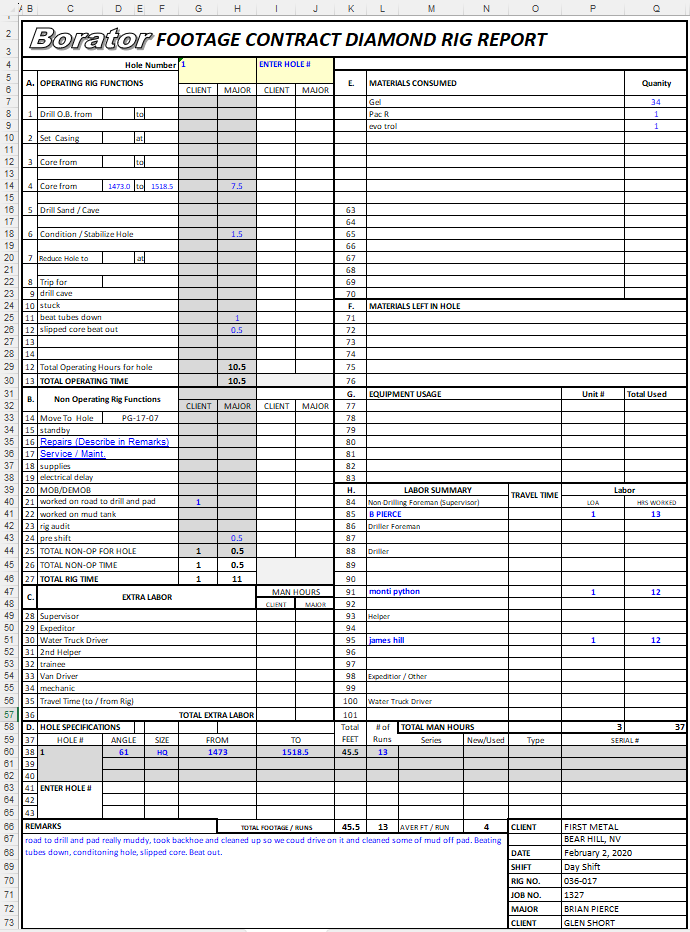
And how long will you be transferring this data to a relational database?!
Such a report is already a "big egg." It's not just two or three days of work. It is a task that requires not only technical skills (Power Query, Python, VBA) but also a deep understanding of the subject area so as not to make mistakes when transferring hundreds of interconnected fields. Traditional ETL tools can be useless here, as they are designed for structured, not "artistically designed" data.
DBRaptor ETL
I will say right away that we have a solution — DBRaptor ETL, a web service that handles this task. It works right in the browser and can process hundreds of such reports, outputting a consolidated table. DBRaptor ETL (can work offline with your precious data) — meaning you go to the service, launch it, and disconnect from the internet to consolidate your secret reports, whether it's 100 or 200 of them.
Yes, the initial configuration of parsing rules for each new template will take some time — from 30 minutes to a couple of hours, depending on the complexity. But this is incomparable to days of manual work or weeks of writing and debugging a fragile macro. And most importantly, when your contractor "improves" their template, you don't need to call a programmer. You can adapt the parsing rules yourself in 15 minutes. Find the saved template, make changes, test.
I will even demonstrate with a specific example, and you will see for yourself how much time it takes.
Share